WAEC CBT Software Guide for 2026 Exams: Everything You Need to Know
If you’re preparing for the WAEC 2026 examinations, chances are you’ve heard people talk about CBT (Computer-Based Test) like it’s some mysterious new monster. But is it really that scary? Not at all.
Think of WAEC CBT software like learning to ride a bicycle. At first, it feels unfamiliar. But once you understand how it works and practice a little, it becomes smooth and even enjoyable.
This WAEC CBT software guide for 2026 exams is written to help you, parents, teachers, and guardians understand everything in plain English; no tech stress, no confusion.
Let’s break it down together.
What Is WAEC CBT and Why It Matters in 2026
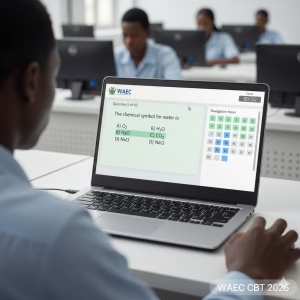
WAEC CBT means answering your examination questions on a computer instead of paper. Instead of shading with pencil, you click answers using a mouse or keyboard.
By 2026, WAEC is expanding CBT because it is:
-
Faster
-
More secure
-
Easier to mark
-
Less stressful when you understand it
CBT is no longer the future, it is the present.
Read more: Dream Achieved: Universities That Accept 140 JAMB Score for Nursing in 2026
2. How WAEC CBT Software Works
The WAEC CBT software is the platform where questions appear during the exam. It works like a digital question paper.
Here’s what happens:
-
You log in with your exam details
-
Questions appear on the screen
-
You select answers by clicking
-
The system saves your responses automatically
No handwriting. No erasing. Just focus.
3. Key Features of WAEC CBT Software
The software is designed to be student-friendly. Key features include:
-
Auto-save: Your answers are saved instantly
-
Timer: Shows remaining exam time
-
Navigation buttons: Move forward and backward easily
-
Question review: Flag questions to revisit later
-
Submit button: Ends your exam securely
These features help reduce panic during exams.
4. Subjects Available on WAEC CBT
WAEC CBT currently focuses mainly on objective (multiple-choice) papers, including:
-
English Language (Objectives)
-
Mathematics
-
Biology
-
Economics
-
Government
-
Commerce
-
CRS / IRS
-
Geography
Essay and practical papers may still be written on paper, depending on WAEC’s final structure for 2026.
5. WAEC CBT Software Interface Explained
When the exam starts, you’ll see:
-
Question number on top
-
Question text in the center
-
Options (A–D) below
-
Timer at the corner
It’s clean, simple, and not crowded. If you can use a phone or laptop, you can use WAEC CBT software.
6. System Requirements for WAEC CBT Practice
To practice WAEC CBT software at home or school, you need:
Check out: Why Farmers Are More Important Than Teachers: Top Debate Points & Perspectives
-
A computer or laptop
-
Minimum 2GB RAM
-
Keyboard and mouse
-
Stable power supply
-
CBT practice software or online platform
You don’t need internet during the real exam.
7. How to Download and Access WAEC CBT Practice Software
You can prepare by using:
-
WAEC-approved CBT practice apps
-
School CBT centers
-
Online CBT practice websites
-
Offline practice software
Always make sure the platform matches WAEC standards, not random apps.
8. Step-by-Step Guide to Using WAEC CBT Software
Here’s a simple walkthrough:
-
Login with your details
-
Read instructions carefully
-
Start the exam
-
Answer questions one by one
-
Use “Next” or “Previous” buttons
-
Review flagged questions
-
Submit before time ends
It’s like navigating a playlist, simple clicks.
9. Time Management in WAEC CBT Exams
Time is shown on the screen, so no wall clock needed.
Smart tips:
-
Don’t spend too long on one question
-
Answer easy questions first
-
Flag difficult ones and return later
-
Watch the timer, but don’t panic
CBT rewards calm thinking.
10. Common Mistakes Students Make in CBT Exams
Avoid these common errors:
See also: Smart Science: Less Competitive Courses in Nigeria with High Job Prospects (2026)
-
Rushing without reading questions
-
Forgetting to submit
-
Clicking answers by mistake
-
Panicking when time is running out
Practice helps you avoid all of these.
11. Tips to Score High Using WAEC CBT Software
To succeed:
-
Practice CBT weekly
-
Learn basic mouse and keyboard skills
-
Read questions slowly
-
Don’t guess blindly
-
Stay calm
Confidence grows with practice.
12. Benefits of WAEC CBT Over Paper-Based Exams
CBT offers many advantages:
-
Faster results
-
Less exam malpractice
-
Clear questions
-
No handwriting stress
-
Fairer marking
It levels the playing field for everyone.
13. WAEC CBT for Private and School Candidates
Both school candidates and private candidates will use CBT where applicable.
Private candidates should:
-
Register early
-
Practice CBT in accredited centers
-
Understand login procedures
Preparation is key for both groups.
14. How Parents and Teachers Can Help
Parents and teachers play a big role by:
-
Encouraging CBT practice
-
Providing access to computers
-
Reducing exam fear
-
Offering moral support
A calm student performs better.
15. What to Expect on WAEC CBT Exam Day
On exam day:
-
Arrive early
-
Follow instructions
-
Stay focused
-
Trust your preparation
CBT is not a trap, it’s a tool.
Conclusion
The WAEC CBT software guide for 2026 exams shows one clear truth: CBT is not something to fear. It’s simply a new way of testing knowledge. With practice, patience, and the right mindset, students can perform even better than before.
Remember, exams don’t test intelligence, they test preparation. And now, you know how to prepare.
Frequently Asked Questions (FAQs)
1. Is WAEC CBT compulsory for 2026 exams?
WAEC is expanding CBT, especially for objective papers, so many candidates will use it in 2026.
2. Can I practice WAEC CBT without internet?
Yes, many CBT practice software programs work offline.
3. Are WAEC CBT questions harder than paper exams?
No, the difficulty level is the same. Only the mode of answering changes.
4. What happens if the computer shuts down during CBT?
Your answers are auto-saved, and supervisors will assist immediately.
5. Is WAEC CBT suitable for students who are not good with computers?
Yes. With basic practice, any student can adapt easily.


